Pages 52–59 · Markdown
Chapter 8 – Functions
Consider a sausage machine. You feed it meat in at one end, turn a handle, and out comes a sausage at the other end. Providing pork meat gives us a pork sausage, beef, a beef sausage and so on.
Functions are practically indistinguishable from sausage machines but there is a difference: they work on data instead of meat. You supply one value (called the argument), mince it up by doing some calculations or transformations on it, and eventually get another value, the result.
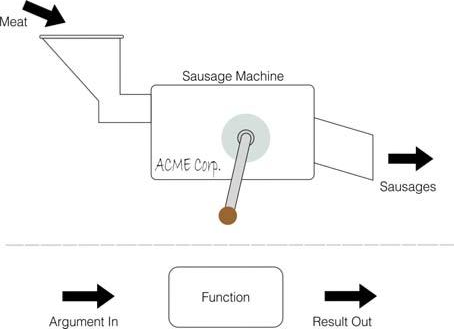 Meat
Meat
Sausage Machine
ACME Corp.
Sausages
Argument In
Function
Result Out
Fig. 5 – How functions work
Different arguments give different results, and if the argument is completely inappropriate the function will stop and give an error report.
Just as you can have different machines to make different products – one for sausages. another for dish cloths, and a third for fish-fingers and so on, different functions will do different calculations. Each will have its own value to distinguish it from the others.
You use a function in expressions by typing its name followed by the argument, and when the expression is evaluated the result of the function will be worked out.
Functions, always produce a specific datatype as result and as such they are used in the same way as variables of a certain datatype in expressions In fact string producing functions names end with a $ sign just like regular strings in order to not confuse us. For example running the following (see below for more regarding VAL):
10 avalue$="10"
20 b=10+VAL(avalue$)
30 PRINT b
will produce 20 which is obviously a number. As far as expressions and NextBASIC are concerned VAL (x$) can be used in lieu of any numeric variable or indeed number.
Order of calculations using functions
Expanding on what we saw on Chapter 6, if you mix functions and calculations in a single expression, then the functions' resulting values will be calculated first out before the rest of the operations. Again, however, you can circumvent this rule by using parentheses.
For instance, at the example below, there are two expressions which differ only in the parentheses, and yet the calculations are performed in an entirely different order in each case (although, as it happens, the end results are the same).
Each column shows the succession of operations according to their initial syntax which is found at the top of each column:
| LEN "Fred"+ LEN "Bloggs" | LEN ("Fred"+"Bloggs") |
| 4+LEN "Bloggs" | LEN ("FredBloggs") |
| 4+6 | LEN "FredBloggs" |
| 10 | 10 |
Functions can be separated in built-in (contained within NextBASIC) and user-defined ones (the ones we write). Below we'll visit the in-built functions categorised according to the datatype we give them as input to manipulate and/or transform.
Please note that as the functions devoted to maths are a bit more complicated we will list them separately in their own chapter.
String functions
LEN
LEN x$, works out the length of a string. Its single argument x$ is the string whose length you want to find, and its result is the length, so that if you type
PRINT LEN "ZX Spectrum Next"
the answer 16 will be printed on screen, that is the number of characters in ZX Spectrum Next (spaces are counted as a character).
STR$
STR$ converts numbers into strings; that however is not its only capability and for that reason it has two forms. Apart from the simplest task of making a string out of a number in the way it would appear on screen displayed by a PRINT statement (that also means converted – or cast – into a decimal number), it can also do the same but converting at the same time the number to a different base!
The simplest form STR$ x doen't use parentheses to contain its single argument x –a number–, and its result is the string that would appear on the screen if the number were displayed by a PRINT statement. Note how its name ends in a $ sign to show that its result is a string. For example, you could say:
a$=STR$ 1e2
which would have exactly the same effect as typing:
a$="100"
since the numeric argument gets converted from scientific notation, to a standard decimal prior to printing. Or you could say:
PRINT LEN STR$ 100.000
and get the answer 3, because STR$ 100.0000="100".
STR$(x, [base [, places]]) on the other hand uses parentheses, but takes up to 3 numeric arguments. It returns a string representation of number n in the optionally specified base (2 to 36). For bases > 10, digits larger than 9 are represented with capital letters starting with A. If the base is not specified it's assumed it's 10. If optional argument places is present, then a fractional part of places' digits is also output. Let's first rewrite the example above in a couple of ways:
a$=STR$ (1e2)
a$=STR$ (1e2,16)
If you assumed prior to trying, that the first produces the same result as the STR$ without parentheses further above, you'd be correct. It too, returns 100. The second however demonstrates the power of conversion as we told STR$ to convert to base-16 (hexadecimal). This returns 64 which is 100 expressed in the hexadecimal system. The following two
examples show what happens when we request both a conversion and the optional places:
STR$(201.5, 16)
which gives us C9 (which equals 201, the integer part of 201.5 ) and
STR$(3.5, 2, 4)
which converts 3.5 into a binary number with 4 fractional places for .5 and returns 11.1000.
IN
IN (source$, match$ [, startpos[, wild$]]) returns the leftmost character position number where match$ was found in source$. Optional parameter startpos determines the position within source$ to begin the search (default=1). If startpos is negative, the search starts from position ABS(startpos) and proceeds backwards (More about ABS further below).
The value returned will be between 1 and LEN source$ if a match was found or 0 if a match is not found, startpos is 0, match$ or source$ are the empty string ("").
If you're not entirely sure of the spelling of the word you're looking for within the original string you have the option to use a wildcard1 character which itself is user-definable. Any character you enter in wild$ or the copyright symbol © (ASCII 127), will become the wildcard character which you can then substitute in match$ for any character you're unsure about. Any characters in match$ which are the wildcard character will match any character in source$. If wild$ is the empty string (""), the wildcard character is ASCII 0. Here are some examples to better illustrate:
PRINT IN("Harry is awesome"," ")
Prints 6 on the screen as a space is a valid character while
PRINT IN("Harry is awesome","
         ",7)
Prints 9 as we told IN to start looking from position 7 onwards.
PRINT IN("Harry is awesome","
         ",-16)
will also return 9 as it's looking backwards and finally
PRINT IN("Here's
         Garry!","a%%y",1,"%")
prints 9 as we substituted any letter for the symbol % and the first string is located there. If however we modified the above slightly and made it:
PRINT IN("Here's
         Garry!","%r",1,"%")
we'd get 2 as the first match er for the %r is located there. If we then modified it a little further to:
PRINT IN("Here's
         Garry!","%r",5,"%")
it would have returned 10 as starting from position 5 the first match is the rr in Garry.
1 A wildcard character is a character placeholder for any possible character
VAL and VAL$
VAL x$ is like STR$ in reverse as it converts string x$ into the numeric representation of said string. For instance:
VAL "3.5"
returns 3.5. That is because if you take any number, apply STR$ to it, and then apply VAL to it, you will get back to the number you first thought of. That being said, if you take a string, apply VAL to it, and then apply STR$ to it, you do not always get back to your original string.
VAL is an extremely powerful function, because the string which is its argument is not restricted to looking like a plain number – it can be any numeric expression. Thus, for instance:
VAL "2*3"
will return 6 or even:
VAL ("2"+"*3")
will return the same. There are two things happening here. In the first, the argument of VAL is evaluated as a string: the string expression "2"+"*3" is evaluated to give the string "2*3". Then, the string has its double quotes stripped off, and what is left is evaluated as a number; so 2*3 is evaluated to give the number 6.
Now the following can get pretty confusing pretty fast if you do not pay the requisite attention: Remember that inside a string a string quote must be written twice. If you go down into further depths of strings, then you find that string quotes need to be quadrupled or even octupled.
There is another function, rather similar to VAL, called VAL$ x$. Its argument x$ is still a string, but its result is also a string. To see how this works, recall how VAL functions in two steps: first its argument is evaluated as a string, then the double quotes are stripped off this, and whatever is left is evaluated as a number. With VAL$, the first step is the same, but after the string quotes have been stripped off in the second step, whatever is left is evaluated as another string. Thus:
VAL$ """Fruit punch"""
equals to Fruit Punch (Notice how the string quotes proliferate again.) Do:
a$="99"
and print out all of the following: VAL a$, VAL "a$", VAL """a$""", VAL$ a$, VAL$ "a$" and VAL$ """a$""". Some of these will work, and some of them won't; try to explain all the answers (Try not to get overly confused).
Numeric functions
SGN
SGN x is the sign function (sometimes called signum). It is the first function you have seen that has nothing to do with strings, because both its argument x and its result are numbers. The result is +1 if the argument is positive, 0 if the argument is zero, and -1 if the argument is negative.
ABS
ABS x is another function whose argument x and result are both numbers. It converts the argument into a positive number (which is the result) by stripping the sign away, so that for instance:
ABS -3.2
is the same as:
ABS 3.2
which in turn equals 3.2
INT
INT x stands for integer part – an integer is a whole number, possibly negative. This function converts a fractional number x into an integer by throwing away the fractional part, so that for instance:
INT 3.9
equals 3. Be careful when you are applying it to negative numbers, because it always rounds down: thus, for instance:
INT -3.9
will return -4
SQR
SQR calculates the square root of a number – the result that, when multiplied by itself, gives the argument. For instance:
SQR 4
returns 2 because 2*2 = 4
SQR 0.25
returns 0.5 because 0.5*0.5 = 0.25 and finally:
SQR 2
will return 1.4142136 (approximately) because 1.4142136*1.4142136=2.0000001
If you multiply any number (even a negative one) by itself, the answer is always positive. This means that negative numbers do not have square roots, so if you apply SQR to a negative argument you get an error A Invalid Argument.
User defined functions using DEF and FN
You can also define functions of your own. Their names follow exactly what is valid for procedures. Their arguments/parameters follow the conventions about procedures as well. Additionally just like procedures and subroutines, functions can also be recursive. Recall the factorial example from Chapter 4 and let's try to express it in a function form
DEF FN factor(n)=n?(1,1,n*FN
         factor(n-1))
You define a function by putting a DEF statement somewhere in the program. For instance, here is the definition of a function FN s whose result is the square of the argument:
DEF FN sq(x)=x*x: REM square of x
The sq following the DEF FN is the name of the function. The x in parentheses is a name by which you wish to refer to the argument of the function.
After the = sign comes the actual definition of the function. This can be any expression, and it can also refer to the argument using the name you've given it (in this case, x) as though it were an ordinary variable.
When you have entered this line, you can invoke the function just like one of the computer's own functions, by typing its name, FN sq, followed by the argument. Remember that when you have defined a function yourself, the argument must be enclosed in parentheses. Try it out a few times:
PRINT FN sq(2)

PRINT FN sq(3+4)

PRINT 1+INT FN sq (LEN "chicken"/2+3)
Once you have put the corresponding DEF statement into the program, you can use your own functions in expressions just as freely as you can use the computer's.
Note: in some dialects of BASIC you must even enclose the argument of one of the computer's functions in parentheses. This is not the case in NextBASIC.
INT always rounds down. To round to the nearest integer, add .5 first – you could write your own function to do this:
20 DEF FN r(x)=INT (x+0.5):
   REM gives x rounded to the
   nearest integer.
You will then get, for instance:
| FN r(2.9) = 3 | FN r(2.4) = 2 |
| FN r(-2.9) = -3 | FN r(-2.4) = -2 |
Compare these with the answers you get when you use INT instead of FN r. Type in and run the following:
10 x,y,a=0,0,10
20 DEF FN p(x,y)=a+x*y
30 DEF FN q()=a+x*y
40 PRINT FN p(2,3),FN q()
There are a lot of subtle points in this program.
First, a function is not restricted to just one argument: it can have more, or even none at all – but you must still always keep the parentheses.
Second, it doesn't matter whereabouts in the program you put the DEF FN statements. After the computer has executed line 10, it simply skips over lines 20 and 30 to get to line 40. They do, however, have to be somewhere in the program. They can't be in a command.
Third, x and y are both the names of variables in the program as a whole, and the names of arguments for the function FN p. FN p temporarily forgets about the variables called x and y, but since it has no argument called a, it still remembers the variable a. In other words the exposed parameters of a function are always LOCAL within the function.
Thus when FN p(2,3) is being evaluated, a has the value 10 because it has been initialised in line 10, x has the value 2 because it is the first argument, and y has the value 3 because it is the second argument. Both x and y albeit also defined in line 10 are treated as LOCAL variables and their value doesn't modify their global counterparts. The result is then, 10+2*3=16.
When FN q() is being evaluated, on the other hand, there are no arguments. So a, x and y all still refer to the variables and have values 10, 0 and 0 respectively. The answer in this case is 10+0*0=10.
Now change line 20 to:
20 DEF FN p(x,y)=FN q()
This time, FN p(2,3) will have the value 10 because FN q will still go back to the variables x and y rather than using the arguments of FN p.
DEF FN can take parameters passed by REFerence as is obvious from the next example:
DEF FN ian$(REF
         jen$(),idx)=jen$(idx)
Some BASICs (but not NextBASIC) have functions called LEFT$, RIGHT$, MID$ and TL$.
LEFT$ (a$,n) gives the substring of a$ consisting of the first n characters.
RIGHT$ (a$,n) gives the substring of a$ consisting of the characters from nᵗʰ on.
MID$ (a$, n₁, n₂) gives the substring of a$ consisting of n₂ characters starting at the n₁ᵗʰ.
TL$ (a$) gives the substring of a$ consisting of all its characters except the first.
You can write some user-defined functions to do the same. For example:
10 DEF FN TL$(a$)=a$(2 TO )
20 DEF FN LEFT$(a$, n)=a$( TO
   n)
Check that these work with strings of length 0 or 1.
Note that our FN LEFT$ has two arguments, one a number and the other a string.
A function cannot have integer arguments, nor use integer expressions in its definitions.
NextBASIC functions within integer expressions
We already discussed the usage of the INT {...} keyword which converts any floating point expression into an integer expression, but in many cases this can be slow. In other cases the values produced by a function are either plain 8 or 16 bit integers which means that integer-only versions of said function would provide significant boost over their standard counterparts. NextBASIC caters for these cases with special integer-only forms of the following functions:
| ABS n | Return the ABSolute value of n – See this Chapter |
| IN n | Read value from Hardware Port n – See Chapter 22 |
| INPUT n | Read/Define input controllers – See Chapters 17 and 22 |
| REG n | Read value from Next Register n – See Chapter 22 |
| PEEK a | Read byte from address a in memory – See Chapter 23 |
| DPEEK a | Read word2 from memory (double PEEK) – See Chapter 23 |
| USR3 a | Execute Machine Code routine – See Chapter 25 |
| USR$ a | Execute Machine Code routine – See Chapter 25 |
| BIN n | Synonym for @n, specifying binary values |
| RND n | Generates pseudo-random value in range 0 to n–1 (equivalent to floating-point INT (RND*n) ) |
| BANK b PEEK o | Read byte at offset o from bank b – See Chapter 23 |
| BANK b DPEEK o | Read word at offset o from bank b (double PEEK) – See Chapter 23 |
| BANK b USR o | Execute Machine Code routine at offset o in bank b – See Chapters 23 and 25 |
| BANK b USR$ o | Execute Machine Code routine at offset o in bank b – See Chapters 23 and 25 |
These are written by including a % sign in front of them like all integer expressions. For example to read from hardware port 254:
%a = % IN 254
Or to check what speed your ZX Spectrum Next is running (masking the speed bits of NextREG 7) you could give :
PRINT %REG 7 & BIN 00000011
Randomly read a byte from the ROM:
%a=%RND 16384:PRINT %a,% PEEK a
Exercise
-
Use the function FN sq(x)=x*x to test SQR. You should find that:
FN sq(SQR x)=x
if you substitute any positive number for x, and:
SQR FN s(x)=ABS x
whether x is positive or negative (Why the ABS?)
-
Write functions FN RIGHT$ and FN MID$
2 A word in standard computer terminology is a two-byte (ie. 16 bit) value. 32 bit values (two-word) are called Long Words. 3: USR and USR$ are very special functions as they also act like commands but using a function syntax
ZX Spectrum Next User Manual, 3rd Edition (ISBN 978-1-5272-5496-1), written and illustrated by Phoebus R. Dokos. Copyright © 2020-2024 Phoebus Dokos / SpecNext Ltd. Licensed under CC BY-NC-SA 4.0. This is a transcription and can contain errors; check any doubt against the printed page.