Chapter 8 – Functions
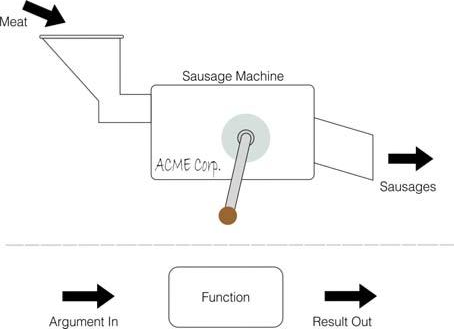
Consider a sausage machine. You feed it meat in at one end, turn a handle, and out comes a sausage at the other end. Providing pork meat gives us a pork sausage, beef, a beef sausage and so on.
Functions are practically indistinguishable from sausage machines but there is a difference: they work on data instead of meat. You supply one value (called the argument), mince it up by doing some calculations or transformations on it, and eventually get another value, the result.
 Meat
Meat
Sausage Machine
ACME Corp.
Sausages
Argument In
Function
Result Out
Fig. 5 – How functions work
Different arguments give different results, and if the argument is completely inappropriate the function will stop and give an error report.
Just as you can have different machines to make different products – one for sausages. another for dish cloths, and a third for fish-fingers and so on, different functions will do different calculations. Each will have its own value to distinguish it from the others.
You use a function in expressions by typing its name followed by the argument, and when the expression is evaluated the result of the function will be worked out.
Functions, always produce a specific datatype as result and as such they are used in the same way as variables of a certain datatype in expressions In fact string producing functions names end with a $ sign just like regular strings in order to not confuse us. For example running the following (see below for more regarding VAL):
10 avalue$="10"
20 b=10+VAL(avalue$)
30 PRINT b
will produce 20 which is obviously a number. As far as expressions and NextBASIC are concerned VAL (x$) can be used in lieu of any numeric variable or indeed number.
Order of calculations using functions
Expanding on what we saw on Chapter 6, if you mix functions and calculations in a single expression, then the functions' resulting values will be calculated first out before the rest of the operations. Again, however, you can circumvent this rule by using parentheses.
For instance, at the example below, there are two expressions which differ only in the parentheses, and yet the calculations are performed in an entirely different order in each case (although, as it happens, the end results are the same).
Each column shows the succession of operations according to their initial syntax which is found at the top of each column:
ZX Spectrum Next User Manual, 3rd Edition (ISBN 978-1-5272-5496-1), written and illustrated by Phoebus R. Dokos. Copyright © 2020-2024 Phoebus Dokos / SpecNext Ltd. Licensed under CC BY-NC-SA 4.0. This is a transcription and can contain errors; check any doubt against the printed page.