Fig. 13 below visualises the way layers compound, to form the ZX Spectrum Next display.
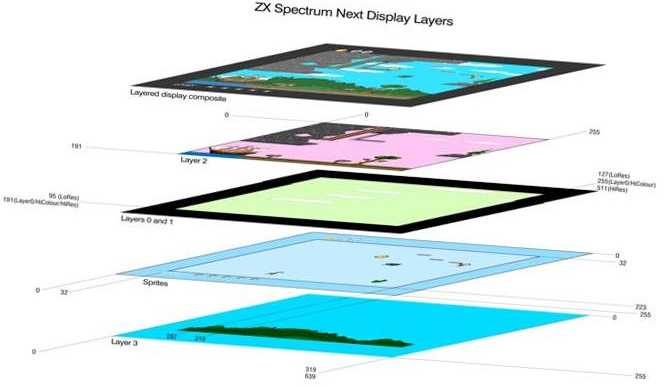
Fig. 13 – Display Layers
(Graphics courtesy of Lampros Potamianos from: The Hollow Earth Hypothesis)
You will notice a few odd things about the diagram above. First, it is out of order with the sprites appearing below Layers 0 – 2. That brings us to the second thing (don't worry the dots will be connected shortly) which is that the Sprite Layer as well as Layer 3 have a higher usable resolution than Layers 0 through 2. The order was changed to group the like resolutions ranges together and better visualise that Layer 3 as well as the Sprite System have a maximum of 320 pixel horizontal by 256 pixels vertical resolution as opposed to the 256 pixel by 192 pixel standard pixel size resolution of the other layers7. As for the order as seen in the LAYER OVER command, it really doesn't matter, as it can be rearranged in the way we see fit. In the specific example above we can see how one can mix-and-match several Layers to construct a more complex final visual; Layer 3 is used for the background, the extended sprite area for relatively static information about the game (Lives and score), LoRes (Layer 1,0) for basic parallax animation (clouds) and Layer 2 for the remaining more complex and colourful graphics.
It's also noteworthy, that although we spoke about memory organisation in regards to colour for all layers, we did not do so for the Sprite System. That is because sprites do not occupy normal memory but instead, use their own dedicated memory that's located within the Next Sprite Engine hardware. The LAYER command other than to set priorities of display does not affect, nor addresses the Sprite Engine directly therefore in the following commands, the latter is not referenced anywhere.
There are more LAYER compound commands that are more pertinent to graphics rather than colour and others that deal with motion in some fashion or other. We will revisit therefore LAYER in more detail in the following sections and chapters. The main functionality of the LAYER command which is none other than changing graphic modes.
LAYER number, parameter
will change the layer to the one specified by number with an optional parameter according to the list below:
| LAYER 0 | Select legacy ZX Spectrum Mode |
| LAYER 1,0 | Select Layer 1, LoRes mode |
| LAYER 1,1 | Select Layer 1, standard resolution mode |
| LAYER 1,2 | Select Layer 1, HiRes mode8 |
7 Layer 2 supports higher resolutions but as far as NextBASIC is concerned, currently only 256 x 192 is usable 8: HiColour and HiRes modes are also called Timex modes as they were originally introduced in the Timex Sinclair TS2068 advanced ZX Spectrum compatible computer which was released primarily for the US market in 1983.
ZX Spectrum Next User Manual, 3rd Edition (ISBN 978-1-5272-5496-1), written and illustrated by Phoebus R. Dokos. Copyright © 2020-2024 Phoebus Dokos / SpecNext Ltd. Licensed under CC BY-NC-SA 4.0. This is a transcription and can contain errors; check any doubt against the printed page.