This is best demonstrated visually so, let's try to implement the following sprite via DATA statements:
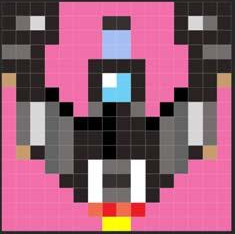
Fig. 15 – A sprite
The transparency (the large magenta-coloured area) is set to index 227 (as we've seen in Chapter 15), the Global Transparency Colour – which for the purposes of our example has been left the default. The rest displays a little spaceship in brown and grey while the cockpit is demonstrated in blue and white.
Let's start with the DATA statements. Some line numbers are omitted as we'll be adding them in the course of our animation example
 10 ; Sprite: Romylos Dokos © 2019
 30 RESTORE
 40 BANK NEW a
 50 FOR F=0 TO 255
 60 READ n: BANK a POKE f,n
 70 NEXT f
 80 SAVE "spaceship.spr" BANK a,0,256
210 REM Sprite Pattern 0
220 DATA 68, 68, 68, 68, 227, 227,
    227, 227, 227, 227, 227, 227, 68,
    68, 68, 68
230 DATA 68, 182, 219, 68, 227, 227,
    227, 68, 68, 227, 227, 227, 68,
    219, 182, 68
240 DATA 68, 68, 68, 68, 227, 227,
    227, 55, 55, 227, 227, 227, 68,
    68, 68, 68
250  DATA 182, 182, 68, 227, 227,
    227, 227, 55, 55, 227, 227, 227,
    227, 68, 182, 182
260 DATA 68, 68,  68, 227, 227, 227,
    68, 68, 68, 68, 227, 227, 227,
    68, 68, 68
270 DATA 240, 68, 68, 227, 227, 227,
    68, 255, 127, 68, 227, 227, 227,
    68, 68, 240
280 DATA 227, 68, 68, 0, 227, 227,
    68, 127, 127, 68, 227, 227, 0,
    68, 68, 227
290 DATA 227, 182, 219, 72, 0, 227,
    182, 0, 68, 68, 227, 0, 72, 219,
    182, 227
ZX Spectrum Next User Manual, 3rd Edition (ISBN 978-1-5272-5496-1), written and illustrated by Phoebus R. Dokos. Copyright © 2020-2024 Phoebus Dokos / SpecNext Ltd. Licensed under CC BY-NC-SA 4.0. This is a transcription and can contain errors; check any doubt against the printed page.