higher one are available at any moment. Any number of notes within these two octaves can be played one after another, for example:
10 a$="cfedafgCFEDAFGCC"
20 PLAY a$
If you want to span more than just two octaves, you can change the overall pitch of the channel playing by using the octave command O followed by a number from 0 to 8. If you do not specify an octave (as in the example above), this defaults to 5 (the range containing middle C). The octave command remains in force for all notes following it until a new octave command is given.
This program lets you hear the same tune played in a higher octave (just add the O7 to your earlier program):
10 a$="O7cfedafgCFEDAFGCC"
20 PLAY a$
Try changing the octave number progressively to hear the full pitch range which your ZX Spectrum Next's PSGs can produce.
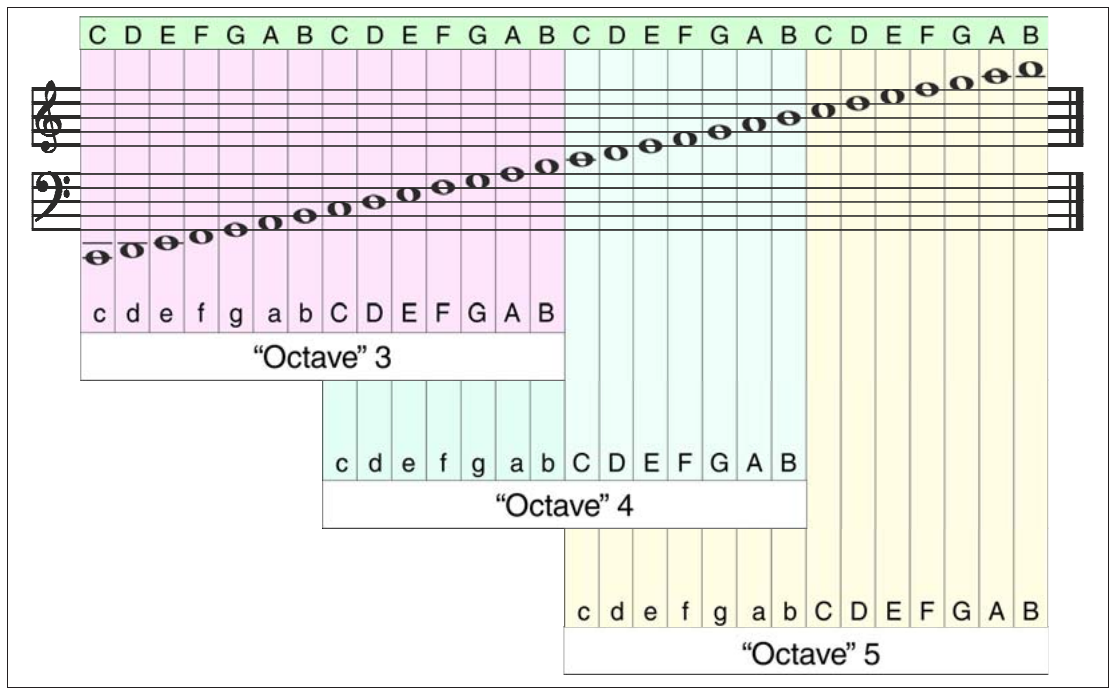
Since each pitch range covers two octaves, two adjacent ranges overlap. For example, the high part of O4 contains the low part of O5 (see Figure below). The following diagram shows how you can create different notes using the PLAY octave command. As mentioned previously, the command O followed by a number from 0 to 7 sets the current PSG to a range of two octaves beginning with a C. The diagram shows the complete range of notes covered by O3, O4, and O5. Adjacent octave ranges overlap, so the same notes appear in the upper part of one range and the lower part of another. Individual notes within an octave range are set by using the letters c to b in lower case for the lower notes and C to B in capitals to give the notes in the upper octave. Placing a # before any note letter gives a sharp note – a $ flattens it.
C D E F G A B C D E F G A B C D E F G A B C D E F G A B
c d e f g a b C D E F G A B
“Octave” 3
              c d e f g a b C D E F G A B
              “Octave” 4
                            c d e f g a b C D E F G A B
                            “Octave” 5
Fig. 18 – Octaves and Pitch values for making music with PLAY
Note duration
If you do not specify the length of each note, they will all be played at the same length (as crotchets) as in the examples above. You can fix the length of any note or series of notes by prefixing it with a number from 1 to 12. This program lets you hear the different note du-
ZX Spectrum Next User Manual, 3rd Edition (ISBN 978-1-5272-5496-1), written and illustrated by Phoebus R. Dokos. Copyright © 2020-2024 Phoebus Dokos / SpecNext Ltd. Licensed under CC BY-NC-SA 4.0. This is a transcription and can contain errors; check any doubt against the printed page.