with short settings, eg X300. Single-shot effects (W0 to W3) need a longer period, eg X1000. Try changing the value after X in the program above to hear the difference.
Tempo
The speed (tempo) at which a piece of music is played can be set with the command T followed by the number of crotchet beats per minute (bpm) in the range 60 to 240. The command controls the speed at which all notes are played, but can only be included in channel A of PSG1 (the first string after the PLAY command) otherwise it is ignored, eg:
10  a$="T180cdefg"
20 PLAY a$, "T120CDEFG"
will play octave chords but at 180bpm as the second setting is ignored. If no tempo is specified, the music will be played at 120 bpm.
Repeated phrases
Any musical phrase can be repeated by enclosing the appropriate string or part of a string in parentheses. For example:
10 PLAY "abC(DEFG)"
will repeat the last four notes. If there is an unequal number of parentheses, the phrase will be repeated back to the last parenthesis. If there is only a closing parenthesis, the phrase will be repeated back to the beginning of the string. As an example:
10 PLAY "abCDEFG)"
will repeat all seven notes. Double closing parentheses:
10 PLAY "O2CEGA))"
will cause an infinite repeat. This is particularly useful for things like repetitive bass lines. To turn off an infinite repeat you will need to use the H command.
| Effect Value | Visual Representation | Description |
|---|---|---|
| 0 | 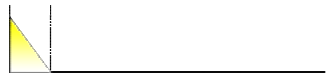 |
Decay then stop |
| 1 | 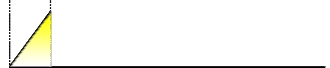 |
Attack then stop |
| 2 | 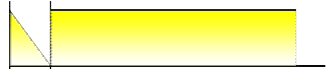 |
Decay then hold |
| 3 | 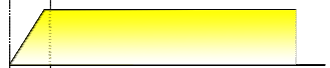 |
Attack then hold |
| 4 | 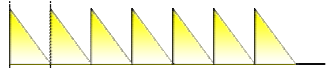 |
Repeated Decay |
| 5 | 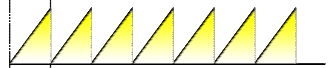 |
Repeated Attack |
| 6 | 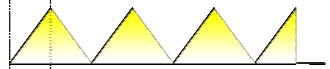 |
Repeated Attack-Decay |
| 7 | 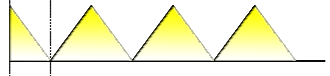 |
Repeated Decay-Attack |
Table 12 – Volume effects values
ZX Spectrum Next User Manual, 3rd Edition (ISBN 978-1-5272-5496-1), written and illustrated by Phoebus R. Dokos. Copyright © 2020-2024 Phoebus Dokos / SpecNext Ltd. Licensed under CC BY-NC-SA 4.0. This is a transcription and can contain errors; check any doubt against the printed page.