CD
CD (for Change Directory) changes the current drive and/or folder (for drives that support folders) or current drive (for drives that do not). CD's syntax is as follows:
CD filespec
where filespec consists of either one or two of the first two parts of a filename (Drive and Folder) for filesystems that support folders (FAT16, FAT32) or of just the Drive for filesystems that do not (+3DOS, IDEDOS). Setting just the current drive with CD is functionally equivalent to using SAVE, LOAD etc with just the drive as the filespec. Unlike folders, there is no way of setting a user area as the default one so if you need to address it you must do so explicitly through the filespec; for example add a 3m: prefix to filenames for files in the user area 3 of drive m:. CD works with wildcards by matching to the first folder in order it finds them and change to that.
CD also accepts three filespec shortcuts: . (single dot), .. (double dot) and one of the following / or \ (forward or backward slash). As we mentioned earlier in the chapter, single dot means: This folder, double dot means: The folder one level up and either slash on their own means: The root folder of the current drive. Single and double dot entries do not exist on the root folder and therefore you cannot use the shortcuts there.
Using a combination of the double dot and slash shortcuts, CD can also easily traverse the folder tree horizontally at the same level without having to write the entire path that precedes the level you're currently in. Obviously that doesn't make sense at the first level under the root as it would involve much more typing than the slash character alone but it works nonetheless!
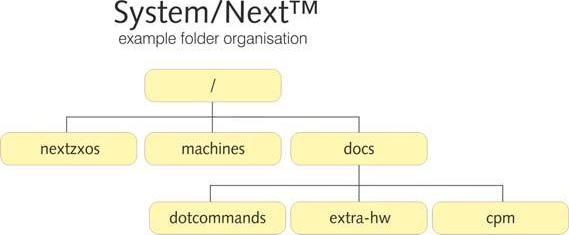
Assuming a structure like the one in your System/Next™ distribution as partly displayed in the figure below, lets provide some examples of horizontal and vertical navigation.
System/Next™
example folder organisation

                              /
                              |
        +----------+---------+---------+
        |          |                   |
    nextzxos   machines               docs
                                        |
                          +-------------+------------+
                          |             |            |
                     dotcommands    extra-hw         cpm
Fig. 21 – Folder tree navigation
Let's agree that we're located in the / of drive c: and we want to first go to c:/docs/cpm and then go to c:/docs/extra-hw before returning to / again.
We could use one of the following sequences:
CD "docs"
CD "cpm"
and then
CD ".."
CD "extra-hw"
and finally
ZX Spectrum Next User Manual, 3rd Edition (ISBN 978-1-5272-5496-1), written and illustrated by Phoebus R. Dokos. Copyright © 2020-2024 Phoebus Dokos / SpecNext Ltd. Licensed under CC BY-NC-SA 4.0. This is a transcription and can contain errors; check any doubt against the printed page.