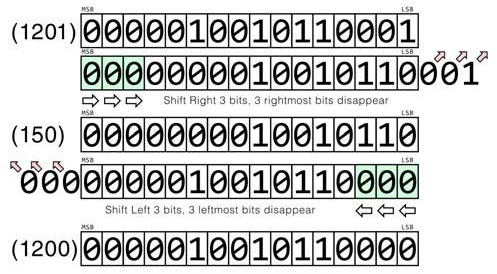
Once we see how the numbers are stored in memory as a series of bits we can easily understand what happened:
| MSB | LSB | |||||||||||||||||||||
| (1201) | 0 | 0 | 0 | 0 | 0 | 1 | 0 | 0 | 1 | 0 | 1 | 1 | 0 | 0 | 0 | 1 | ||||||
|---|---|---|---|---|---|---|---|---|---|---|---|---|---|---|---|---|---|---|---|---|---|---|
| MSB | LSB | ⬀ | ⬀ | ⬀ | ||||||||||||||||||
| colour: pale green 0 | colour: pale green 0 | colour: pale green 0 | 0 | 0 | 0 | 0 | 0 | 1 | 0 | 0 | 1 | 0 | 1 | 1 | 0 | 0 | 0 | 1 | ||||
| ⇨ | ⇨ | ⇨ | Shift Right 3 bits, 3 rightmost bits disappear | |||||||||||||||||||
| MSB | LSB | |||||||||||||||||||||
| (150) | 0 | 0 | 0 | 0 | 0 | 0 | 0 | 0 | 1 | 0 | 0 | 1 | 0 | 1 | 1 | 0 | ||||||
| ⬁ | ⬁ | ⬁ | MSB | LSB | ||||||||||||||||||
| 0 | 0 | 0 | 0 | 0 | 0 | 0 | 0 | 1 | 0 | 0 | 1 | 0 | 1 | 1 | 0 | colour: pale green 0 | colour: pale green 0 | colour: pale green 0 | ||||
| Shift Left 3 bits, 3 leftmost bits disappear | ⇦ | ⇦ | ⇦ | |||||||||||||||||||
| MSB | LSB | |||||||||||||||||||||
| (1200) | 0 | 0 | 0 | 0 | 0 | 1 | 0 | 0 | 1 | 0 | 1 | 1 | 0 | 0 | 0 | 0 | ||||||
Fig. 4 - Bit shifting
What happens however if we do the same to a floating point variable? Let's rewrite the above example:
100 A=1201
110 A>>=3
120 A<<=3
130 PRINT A
which prints the same number as what we have assigned in line 100! Why the difference? We will need to recruit a function from a little further down this manual to help us better understand. Just type the following:
100 A=1201: PRINT
    A,STR$(A,2,4)
110 A>>=3: PRINT A,STR$(A,2,4)
120 A<<=3:PRINT A,STR$(A,2,4)
The whole trick is in the fractional part of the number we don't normally see because it's 0. By shifting 3 places to the right, we occupied 3 of the fractional places and therefore when we shifted back to the left the number wasn't truncated from the right side of its binary representation!
The remaining bitwise operations are very straightforward. Bitwise AND (&) is used to quickly determine if a bit inside a number is set to 1 or not. The first operand is the number we want to check and the second one is called the bitmask which is the number we check against. Consider these two examples:
PRINT %@10101010 & @01010101
PRINT @11100011 & @10
First example will return 0 while the second 2. The reason for this, is that the numbers in the first example don't have coinciding 1 bits in the same positions while on the second example the second bit will be 1 and as a consequence the bits that match will be the first and second which make binary 10 which in decimal equals 2. To illustrate further:
| 170 | 10101010 | |
| AND 85 | (Bitmask) | 01010101 |
| Result | 00000000 |
As you can see, no bit set to 1 in any position of the two numbers matches each other, therefore the result returned is 0 whereas in the second example:
ZX Spectrum Next User Manual, 3rd Edition (ISBN 978-1-5272-5496-1), written and illustrated by Phoebus R. Dokos. Copyright © 2020-2024 Phoebus Dokos / SpecNext Ltd. Licensed under CC BY-NC-SA 4.0. This is a transcription and can contain errors; check any doubt against the printed page.