chine only the top slot (slot 4) of the address space was banked in and out by the user (located at address range C000h to FFFFh.
When the ZX Spectrum +3 came out, there were two more 16K ROMs introduced, which didn't originally exist; that paired with the need to run CP/M that requires RAM at the bottom of the address map, necessitated the creation of yet another I/O address: 1FFDh.
Between these two ports, there are enough bits to address all the RAM pages of an unexpanded Next, however, on a fully expanded Next, one more port was needed to be able to address the entire physical memory available. These methods are all extending one another so backwards compatibility is ensured, while the introduction of the MMUs allows for a more straightforward memory management system for user programs.
Let's begin how this all works by first looking at 128K style paging. The hardware port that
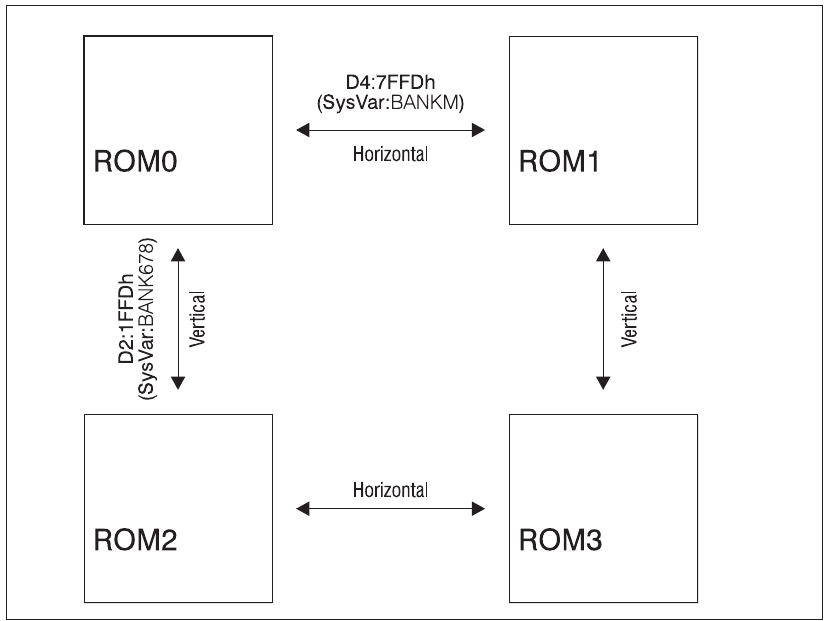
                     D4:7FFDh
                  (SysVar:BANKM)
   ROM0    ←────── Horizontal ──────→    ROM1
    ↑                                      ↑
    │ D2:1FFDh                             │
    │ (SysVar:BANK678)                     │
    │ Vertical                             │ Vertical
    ↓                                      ↓
   ROM2    ←────── Horizontal ──────→    ROM3
Fig. 49 – Horizontal vs Vertical ROM switching
controls it, is at I/O address 7FFDh (32765). The bit layout for this port is as follows:
| Bit | D7 | D6 | D5 | D4 | D3 | D2 | D1 | D0 |
|---|---|---|---|---|---|---|---|---|
| Description | colour: grey | colour: grey | Disable Paging | ROM Select | Screen Select | RAM Select | ||
D2 to D0 is a three bit number that selects which RAM page goes into the C000h to FFFFh slot. In previous models (such as the +3e) in BASIC, RAM page 0 was normally in-situ, and when editing, RAM page 7 was paged in for various buffers and scratchpads.
D3 switches screens: Screen 0 (the Display + Colour Files) was held in RAM5 (beginning at 4000h) and it was the one that BASIC used, screen 1 was held in RAM7 (beginning at C000h) and could only be used by machine code programs.
D4 determines whether ROM0 (the editor ROM) or ROM1 (the 48K BASIC ROM) is paged into Slot 1 at 0000h to 3FFFh.
D5 is a safety feature – once this bit is set, no further paging operations will work. This is normally used when the machine assumes a standard 48K Spectrum configuration and all the memory paging circuitry is locked out. On previous models, this meant that it couldn't be turned back into a 128K machine other than by rebooting; however, the sound chip can still be driven by OUT either from 48K Basic or machine code. On the ZX Spectrum Next however, you can override that lock switch it back to on by setting NextREG 8, D7 to 1.
ZX Spectrum Next User Manual, 3rd Edition (ISBN 978-1-5272-5496-1), written and illustrated by Phoebus R. Dokos. Copyright © 2020-2024 Phoebus Dokos / SpecNext Ltd. Licensed under CC BY-NC-SA 4.0. This is a transcription and can contain errors; check any doubt against the printed page.