Tokens
When not used as single symbols, several character codes are used in an alternative manner, where they are called tokens, Tokens represent whole words, such as PRINT, STOP, >=, <>, <= and so on. This is to save space in the machine's main RAM, thus maximising the available program space by substituting multiple character words for single character codes.
BIN and USR
After the graphics symbols, you will see what appears to be another copy of the alphabet from A to U. These are characters that you can redefine yourself, although when the machine is first switched on they are set as letters – they are called user-defined graphics (or UDGs for short). You can type these in from the keyboard by going into graphics mode, and then using the letters keys from A to U.
To define a new character for yourself, follow this recipe – it defines a character to show the mathematical symbol Σ (Greek for Συνολο=sum).
i. Work out what the character looks like. Each character has an 8x8 square of dots, each of which can show either the paper colour or the ink colour (see Chapter 15 regarding INK and PAPER). You'd draw a diagram something like this, with black squares for the ink colour:
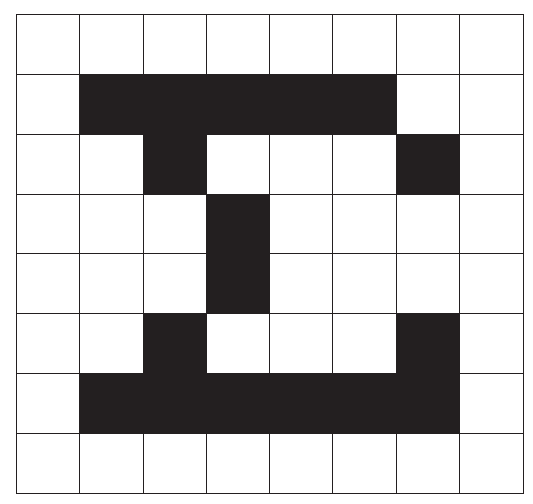
We've left a 1 square margin round the edge because the other letters all have one (except for lower case letters with tails, where the tail goes right down to the bottom of the square).
ii. Work out which user-defined graphic is to show - let's say the one corresponding to S, so that if you press S in graphics mode you get Σ on your screen.
iii. Store the new pattern. Each user-defined graphic has its pattern stored as eight numbers, one for each row. You can write each of these numbers as BIN followed by eight 0s or 1s – 0 for paper, 1 for ink – so that the eight numbers for our character are:
BIN 00000000
BIN 01111100
BIN 00100010
BIN 00010000
ZX Spectrum Next User Manual, 3rd Edition (ISBN 978-1-5272-5496-1), written and illustrated by Phoebus R. Dokos. Copyright © 2020-2024 Phoebus Dokos / SpecNext Ltd. Licensed under CC BY-NC-SA 4.0. This is a transcription and can contain errors; check any doubt against the printed page.